

Ir para conteúdo
View in the app

A better way to browse. Learn more.

Portal do Host

A full-screen app on your home screen with push notifications, badges and more.

To install this app on iOS and iPadOS
  1. Tap the Share icon in Safari
  2. Scroll the menu and tap Add to Home Screen.
  3. Tap Add in the top-right corner.
To install this app on Android
  1. Tap the 3-dot menu (⋮) in the top-right corner of the browser.
  2. Tap Add to Home screen or Install app.
  3. Confirm by tapping Install.

Rodolfo Buaiz

Membro
  • Registro em

  • Última visita

  1. Rodolfo Buaiz alterou sua foto pessoal
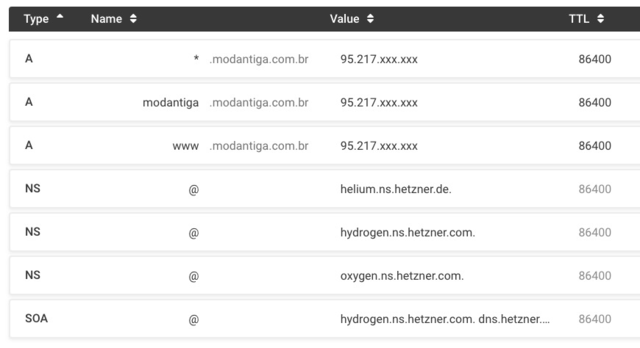
  2. @msaulohenrique Oi Saulo, por acaso pode me orientar com a configuração dos DNS na Hetzner? Apontar os nameservers sempre foi uma coisa simples, e agarrei total na Hetzner, o troço não propaga nem a porrete ? O que tenho agora mesmo é isto: Valeu!
  3. Estou justamente testando o Nextcloud, excelente software, e acabo de rodar o Rclone de um outro servidor direto pro Nextcloud via Webdav. Funciona perfeitamente ? Alias, o Rclone é outro sofware fenomenal =)
Informação Importante

Concorda com os nossos termos?

Configure browser push notifications

Chrome (Android)
  1. Tap the lock icon next to the address bar.
  2. Tap Permissions → Notifications.
  3. Adjust your preference.
Chrome (Desktop)
  1. Click the padlock icon in the address bar.
  2. Select Site settings.
  3. Find Notifications and adjust your preference.