



gustavo.campos
Membro
-
Registro em
-
Última visita
-
 gustavo.campos alterou sua foto pessoal
 -
Quando vou iniciar a instalação do WHMCS mostra o tal erro:
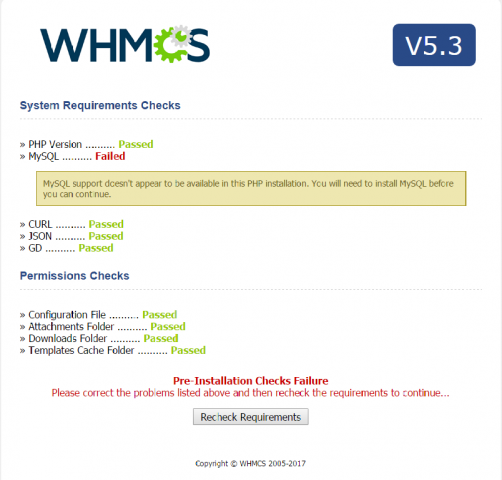
-
Instalei o Ioncube, mais o WHMCS dá erro 500
-
Se eu uso o 7.0 aparece o erro já dado acima:
-
Testei esse tipo, apareceu esse erro no php -i Failed loading /usr/local/ioncube/ioncube_loader_lin_5.5.so: /usr/local/ioncube/ioncube_loader_lin_5.5.so: undefined symbol: zval_update_constant_inline_change Could not open input file: -
-
Fiz tudo até ai, mais quando dou o comando PHP -I Encontro este erro: Failed loading /usr/local/ioncube/ioncube/ioncube_loader_lin_7.0.so: /usr/local/ioncube/ioncube/ioncube_loader_lin_7.0.so: wrong ELF class: ELFCLASS32 phpinfo() Meu arquivo está na pasta ioncube/ioncube mesmo :)
-
Beleza :)
-
PHP 7.0 Estou tentando instalar, mais ta foda kkk
-
Estou com um Dedicado Ubuntu, e quero instalar o WHMCS nele, Porém, quando dou upload em todos arquivos e tento acessar dá este erro: Site error: the file /home/admin/web/gschost.com.br/public_html/sistema/index.php requires the ionCube PHP Loader ioncube_loader_lin_7.0.so to be installed by the website operator. If you are the website operator please use the ionCube Loader Wizard to assist with installation. Como Concerto este erro?
-
Olá, acabei de instalar o vestacp em ubuntu e está dando erro no roundcube: DATABASE ERROR: CONNECTION FAILED! Unable to connect to the database! Please contact your server-administrator. Alguem consegue me ajudar?
